Network communication matrix
This page describes the network communications:
- between the Fed-BioMed components (
nodes, andresearcher), aka application internal / backend communications - for user access to the Fed-BioMed components GUI
- for Fed-BioMed software installation and docker image build
Communications between the components depend on the deployment scenario: with or without VPN/containers.
Network communications for the setup of host machines and the installation of software requirements are out of the scope of this document. Network communications necessary for the host machines to run (access to DNS, LDAP, etc.) regardless of Fed-BioMed are also out of the scope of this document. They are specific to system configuration and installation processes.
Introduction
Fed-BioMed network communications basic principle is that all communications between components are outbound from one node to the researcher. There is no inbound communications to a node.
The exception to this principle are optional direct communications between the components for using the secure aggregation feature (eg. node/researcher to node/researcher communication for cryptographic material negotiation). The communications for crypto material are closed after the negotiation is completed and handle only secagg key negotiation requests.
Fed-BioMed provides some optional GUI for the node (node configuration GUI) and the researcher (Jupyter notebook and Tensorboard). By default, these GUI components are not secured (no HTTPS and/or no certificate signed by well known authority). So they are configured by default to accept only communications from the same machine (localhost).
Software installation
Network communications for software installation cover the Fed-BioMed software installation and setup until the software is ready to be used.
They cover all deployment scenarios. If multiple machines are used, each machine needs to authorize these communications.
- direction is out (outbound communication from the component) or in (inbound communication to the component)
| dir | source machine | destination machine | destination port | service |
|---|---|---|---|---|
| out | component | Internet | TCP/80 | HTTP |
| out | component | Internet | TCP/443 | HTTPS |
"Component" is the node or researcher.
For destination machine, it is simpler to authorize outbound communications to all Internet addresses for the required ports during installation. Indeed, several packaging systems are used for installation, with no guarantee of stable IP address used by the packaging server:
- For all deployment scenarios: conda, pip (all components) and yarn/npm (node GUI component) packages
- Plus for VPN/containers scenarios: dockerhub images, apt apk and cargo packages, git over https cloning, wget and curl download
Note: when using a VPN/containers scenario, a site with very stringent requirements on node's communication can avoid authorizing the above communications for installation of the node components (node and gui). For that, it needs to build the components docker image on another machine (with the above filter), save the image, copy it to the node machine, load it on the node machine. This scenario is not fully packaged and documented by Fed-BioMed but you can find some guidelines here.
Running without VPN/containers
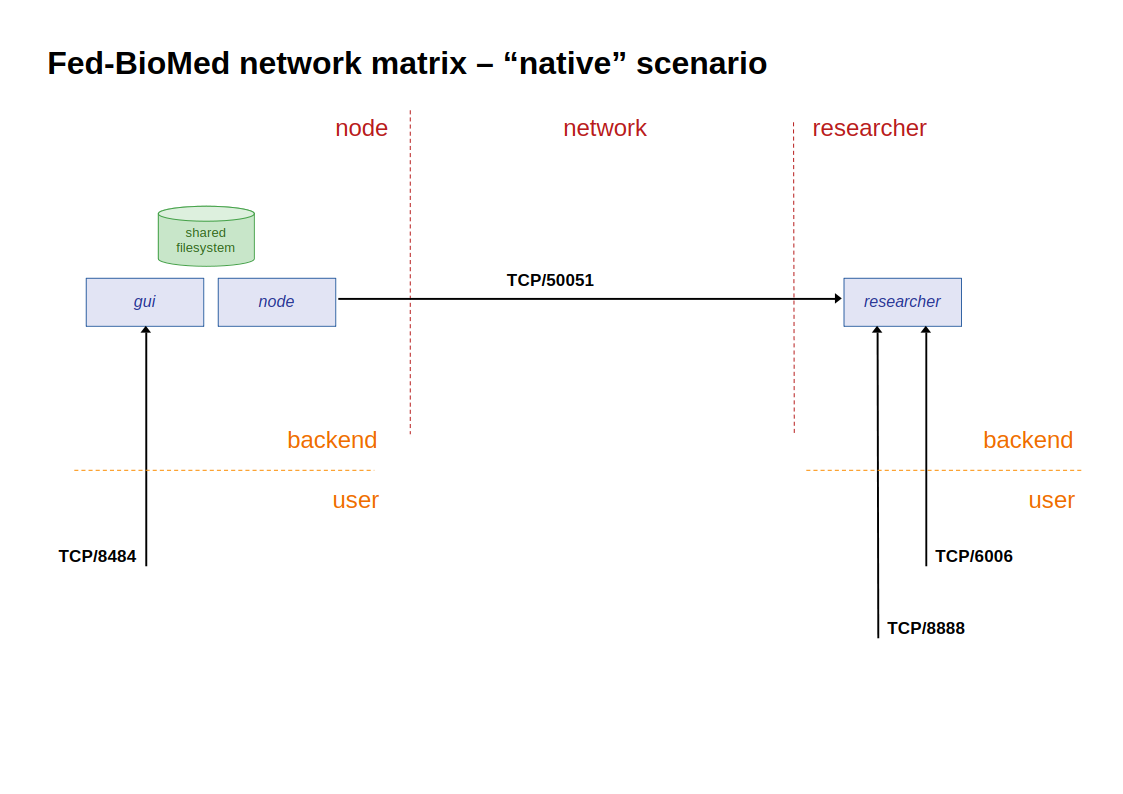
This part describes the communication matrix for running Fed-BioMed without VPN/containers:
- The direction is out (outbound communication from the component) or in (inbound communication to the component)
- Type of communication is either backend (between the application components) or user (user access to a component GUI). Command line user access to component from localhost are not noted here. GUI access are noted though recommended default configuration is to give access only from localhost
- The status is either mandatory (needed to run Fed-BioMed) or optional (a Fed-BioMed experiment can run without this part)
On the node component (node + gui ):
| dir | source machine | destination machine | destination port | service | type | status | comment |
|---|---|---|---|---|---|---|---|
| out | node | researcher | TCP/50051 | gRPC/TLS | backend | mandatory | node-researcher communications |
| in | localhost | gui | TCP/8484 | HTTP | user | optional | node GUI |
nodeandguialso need a shared filesystem, so they are usually installed on the same machine.
On the researcher component (researcher):
| dir | source machine | destination machine | destination port | service | type | status | comment |
|---|---|---|---|---|---|---|---|
| in | nodes | researcher | TCP/50051 | gRPC/TLS | backend | mandatory | node-researcher communications |
| in | localhost | researcher | TCP/8888 | HTTP | user | optional | Jupyter |
| in | localhost | researcher | TCP/6006 | HTTP | user | optional | Tensorboard |
Running with VPN/containers
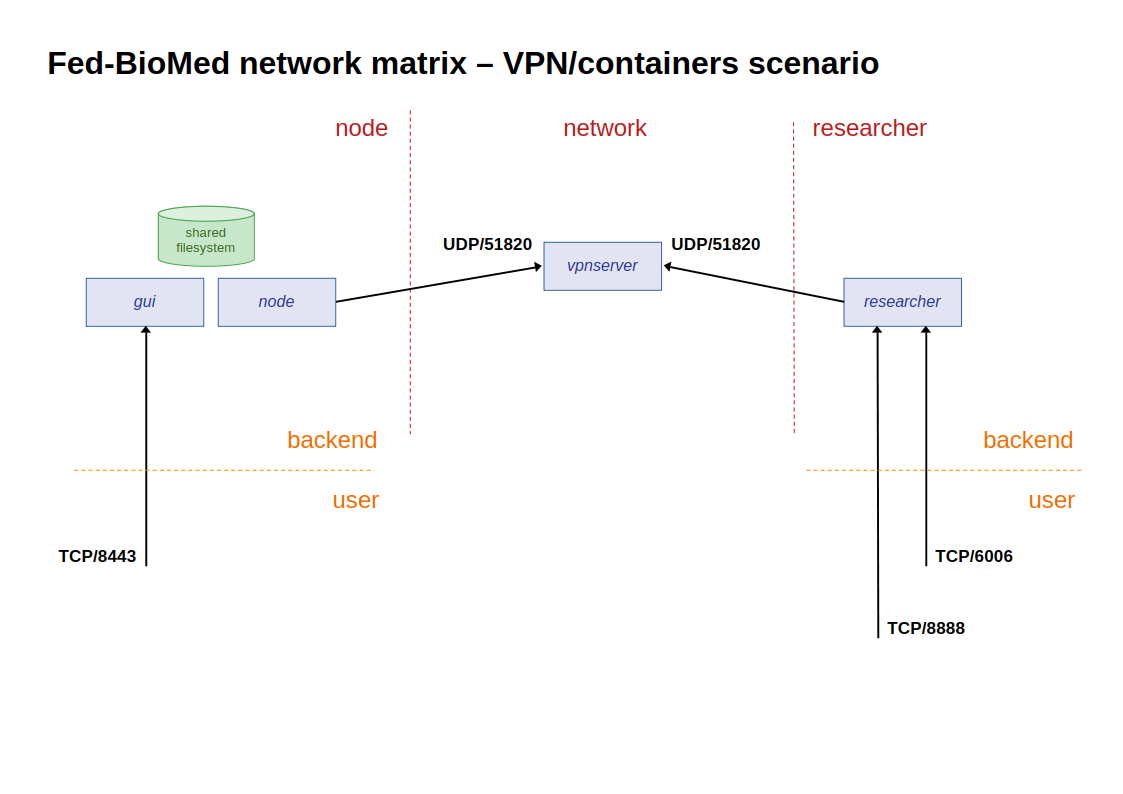
This part describes the communication matrix for running Fed-BioMed with VPN/containers:
- The direction is out (outbound communication from the component) or in (inbound communication to the component)
- Type of communication is either backend (between the application components) or user (user access to a component GUI). Command line user access to component from localhost are not noted here. GUI access are noted though recommended default configuration is to give access only from localhost
- The status is either mandatory (needed to run Fed-BioMed) or optional (a Fed-BioMed experiment can run without this part)
On the node component (node + gui ):
| dir | source machine | destination machine | destination port | service | type | status | comment |
|---|---|---|---|---|---|---|---|
| out | node | vpnserver | UDP/51820 | WireGuard | backend | mandatory | |
| in | localhost | gui | TCP/8443 | HTTPS | user | optional | node GUI |
nodeandguialso need a shared filesystem, so they are usually installed on the same machine.
On the researcher component (researcher):
| dir | source machine | destination machine | destination port | service | type | status | comment |
|---|---|---|---|---|---|---|---|
| out | researcher | vpnserver | UDP/51820 | WireGuard | backend | mandatory | |
| in | localhost | researcher | TCP/8888 | HTTP | user | optional | Jupyter |
| in | localhost | researcher | TCP/6006 | HTTP | user | optional | Tensorboard |
Running with Docker containers (without VPN)
This section describes the communication matrix for running Fed-BioMed using Docker containers without a VPN. This configuration is suitable for extending the base Docker image and containers with customized deployment scenarios (e.g. wrapping Fed-BioMed inside an existing infrastructure, adding a custom VPN layer, or integrating with third-party services) as well as for development, testing, and experimentation.
For deployments involving sensitive or patient data, the VPN/containers scenario is recommended as it comes ready to use with built-in VPN authentication.
In this setup all containers are attached to a shared user-defined Docker bridge network (e.g. fedbiomed-net). Container-to-container communication uses Docker's internal DNS — containers address each other by container name. Ports are published from the container to the host machine to allow user access from localhost (or, in a cross-host setup, from the public internet).
- The direction is out (outbound communication from the component) or in (inbound communication to the component)
- Type of communication is either backend (between the application components) or user (user access to a component GUI). Command line user access to a component from localhost is not noted here. GUI access is noted, though the recommended default is to restrict it to localhost
- The status is either mandatory (needed to run Fed-BioMed) or optional (a Fed-BioMed experiment can run without this part)
On the node component (node + gui):
| dir | source | destination | destination port | service | type | status | comment |
|---|---|---|---|---|---|---|---|
| out | node container | researcher container | TCP/50051 | gRPC | backend | mandatory | via Docker bridge network, using researcher container name |
| in | localhost (host) | node container | TCP/8484 | HTTP | user | optional | Node GUI (published to host) |
nodeandguicontainers share a Docker volume and are typically co-located on the same host.- When running multiple node containers on the same host, each must publish its GUI on a distinct host port (e.g.
8484,8485, …).
On the researcher component (researcher):
| dir | source | destination | destination port | service | type | status | comment |
|---|---|---|---|---|---|---|---|
| in | node containers | researcher container | TCP/50051 | gRPC | backend | mandatory | inbound from any node on the Docker network (or from a remote host in cross-network setups) |
| in | localhost (host) | researcher container | TCP/8888 | HTTP | user | optional | Jupyter notebook (published to host) |
| in | localhost (host) | researcher container | TCP/6007 | HTTP | user | optional | TensorBoard (published to host via socat proxy; TensorBoard listens internally on TCP/6006) |
- The TensorBoard port published to the host is 6007, not the native 6006. Inside the researcher container a
socatprocess forwardscontainer:6007 → localhost:6006. TensorBoard must be started manually on port 6006 before the proxy can serve traffic. - In a cross-network / public IP setup, the researcher's host port
50051is reachable from the internet and nodes on remote machines connect to it directly using the researcher's public IP. No additional port needs to be published on the node side as nodes always initiate the connection. See the Docker deployment guide for configuration details.